
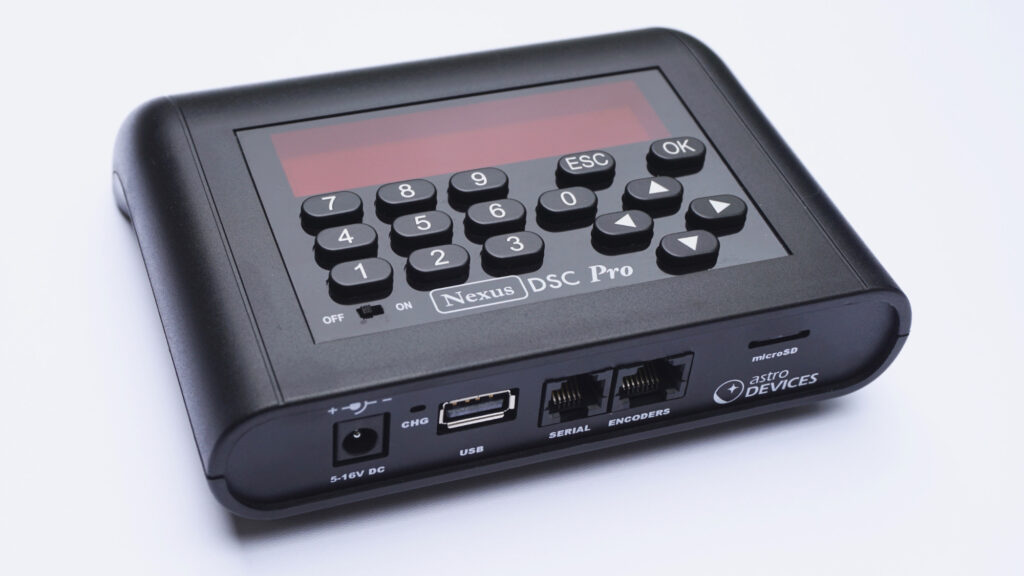
Software Updates
We continually update our software and release new updates. Below are instructions on how to update your unit, as well as the most recent software updates for our Nexus range.
Please subscribe to our software updates emails to receive a notification every time we update our software – there’s a link under each unit’s most recent update below.
How to update your DSC units
How to update your Nexus DSC Pro
Before you start, please decompress the Zip archive to a folder on your hard drive.
To update the firmware and catalogues:
- Remove the micro SD card from your Nexus DSC Pro and insert it into a card reader in your computer
- Copy all files from the folder to the micro SD card and safely remove the card from your computer
- Insert the micro SD card back into Nexus DSC Pro
- Press ‘OK’ key and while holding it turn Nexus DSC Pro ON and keep holding the OK for another 5 seconds; you will be prompted to either proceed with the update or skip over – press the OK to proceed with the update
- Once the firmware has been updated you will be asked if you want to proceed with the update of catalogues; again press the OK key to proceed with the update (it takes around 5 minutes)
- After the update Nexus DSC Pro will check if the update of the firmware and catalogues was successful
- The new firmware will start automatically immediately after checking the update
To restore factory settings:
- Press and hold the ESC key
- Turn Nexus DSC Pro on whole holding the ESC key
- A message will appear on the screen RESTORE FACTORY DEFAULTS?
- Release the ESC key
- Follow the prompt on the screen (press OK to restore, ESC to cancel)
How to update your Nexus DSC
Before you start, please decompress the Zip archive to a folder on your hard drive.
To update the firmware:
- Copy nxdsc.hex to a USB memory stick (should be formatted as FAT32/16/12)
- Plug it into the USB connector on Nexus DSC
- Press ‘OK’ key and while holding it turn Nexus DSC ON and keep holding the OK for another 5 seconds; you will see that the ‘ESC’ key flashes slowly then quickly then slowly again while it is updating the firmware
- It should take less than 40 seconds to update the firmware
- The new firmware will start automatically immediately after the update
To restore factory settings:
- Press and hold the ESC key
- Turn Nexus DSC on whole holding the ESC key
- A message will appear on the screen RESTORE FACTORY DEFAULTS?
- Release the ESC key
- Follow the prompt on the screen (press OK to restore, ESC to cancel)
To update catalogues:
- Update Nexus DSC’s firmware to the latest version
- Remove the micro SD card from Nexus DSC and plug it into a card reader/your computer
- Delete all files from the micro SD card
- Copy all files from the zip archive to the microSD card
- Insert the microSD card into Nexus DSC and turn it ON
- Go to Utilities -> Updates Catalogues from uSD and select ADCTS131.BIN, select ‘Update’ and press OK
- Wait until Nexus DSC finishes the update
- Power cycle Nexus DSC
How to update your Nexus-II
Before you start, please decompress the Zip archive to a folder on your hard drive.
To update the firmware:
- Copy nx2img.hex to a USB memory stick (should be formatted as FAT32/16/12)
- Plug it into the USB connector on Nexus-II
- Press the ‘factory setting’ button (labelled FS) and while holding it turn Nexus-II ON and keep holding the FS for another 10 seconds; you will see that the status LED flashes while it is updating the firmware
- It should take less than 30 seconds to update the firmware
- The new firmware will start automatically immediately after the update – the status LED will start flashing in ‘breathing’ mode.
Nexus DSC Pro firmware updates
Please subscribe to receive Nexus DSC Pro firmware updates here.
Latest updates for the Nexus DSC Pro
Catalogues have been updated in this release.
| Date | Version | |
|---|---|---|
| 18 September 2023 | Nexus DSC Pro Firmware and updated catalogues – firmware version 1.1.29, catalogues version 1.1.7 The firmware version will be shown as 1.1.29 and the date as 2023.09.18 after the update. | Download |
| 12 March 2023 | Nexus DSC Pro Firmware – firmware version 1.1.22 The firmware version will be shown as 1.1.22 and the date as 2023.03.12 after the update. | Download |
| 17 November 2022 | Nexus DSC Pro Firmware and updated catalogues – firmware version 1.1.18, catalogues version 1.1.5 The firmware version will be shown as 1.1.18 and the date as 2022.11.17 after the update. | Download |
Nexus DSC firmware updates
Please subscribe to receive Nexus DSC firmware updates here.
Latest updates for the Nexus DSC
Catalogues have been updated in this release.
| Date | Version | |
|---|---|---|
| 18 September 2023 | Nexus DSC Firmware and updated catalogues – version 1.4.20 The firmware will show as 1.4.20 and the date as 2022.09.18 after the update. | Download firmware Download catalogues |
| 12 March 2023 | Nexus DSC Firmware – version 1.4.16 The firmware will show as 1.4.16 and the date as 2023.03.12 after the update. | Download firmware |
| 17 November 2022 | Nexus DSC Firmware and updated catalogues – version 1.4.11 The firmware will show as 1.4.11 and the date as 2022.11.17 after the update. | Download firmware Download catalogues |
Nexus-II firmware updates
Please subscribe to receive Nexus-II firmware updates here.
Latest updates for the Nexus-II
Nexus firmware updates
Latest updates for the Nexus
| Version | |
|---|---|
| Nexus Firmware Package, version 2.0.9 – Access Point mode (Use it only with your Nexus if it was shipped with the IP address set to 10.0.0.1, standard configuration.) | Download |
| Nexus Firmware Package, version 2.0.9 – Adhoc WiFi mode (Use it only with your Nexus if it was shipped with the IP address set to 169.254.1.1.) | Download |
| Nexus Firmware Package, version 1.2.9 | Download |
| Nexus Configuration Utility for Mac OS X, version 1.0.4 | Download |
| Nexus Configuration Utility for Windows, version 1.0.0.12 | Download |
| Nexus two star alignment utility for Android | Download |
Nexus-S firmware updates
Latest updates for the Nexus-S
| Version | |
|---|---|
| Nexus-S Configuration Utility for Windows, version 1.0.0.1 | Download |
Have any questions or enquiries?
Don’t hesitate to contact us if you run into any trouble or have an enquiry.